Your phone number is linked to many important services, including banking, social media, WhatsApp, UPI apps, and online shopping accounts. If your phone number is leaked online due to a data breach or shared without your permission, you may receive spam calls, phishing messages, OTP scams, or even become a target for identity theft. If you’re searching for How to Check If Your Phone Number Is Leaked Online, this guide will show you safe and legitimate ways to find out.
In this article, you’ll learn how to check if your phone number is leaked online, recognize the warning signs, and take steps to protect your personal information.
Important: Never enter your phone number on unknown websites that promise to “check leaks.” Use only trusted and reputable services.
Table of Contents
- What Does It Mean If Your Phone Number Is Leaked?
- Signs Your Phone Number May Be Leaked
- How to Check If Your Phone Number Is Leaked Online
- What to Do If Your Phone Number Is Leaked
- Tips to Protect Your Phone Number
- Frequently Asked Questions
- Final Thoughts
What Does It Mean If Your Phone Number Is Leaked?
A phone number leak occurs when your mobile number becomes publicly available through a data breach, hacked database, or unauthorized sharing. Cybercriminals may use leaked phone numbers for:
- Spam calls
- Phishing SMS
- WhatsApp scams
- Fake customer support calls
- OTP fraud attempts
- Identity theft
Although a leaked phone number alone doesn’t mean your accounts are compromised, it can increase the risk of targeted scams.
Signs Your Phone Number May Be Leaked
Watch for these warning signs:
- You suddenly receive many spam calls.
- Unknown numbers call repeatedly.
- You receive phishing SMS messages with suspicious links.
- You get OTPs that you didn’t request.
- Your WhatsApp receives unexpected verification attempts.
- Telemarketing calls increase significantly.
- You receive scam messages claiming to be from banks or government agencies.
If you notice several of these signs together, it’s worth checking whether your number has appeared in a known data breach.
How to Check If Your Phone Number Is Leaked Online
1. Check Data Breach Notifications
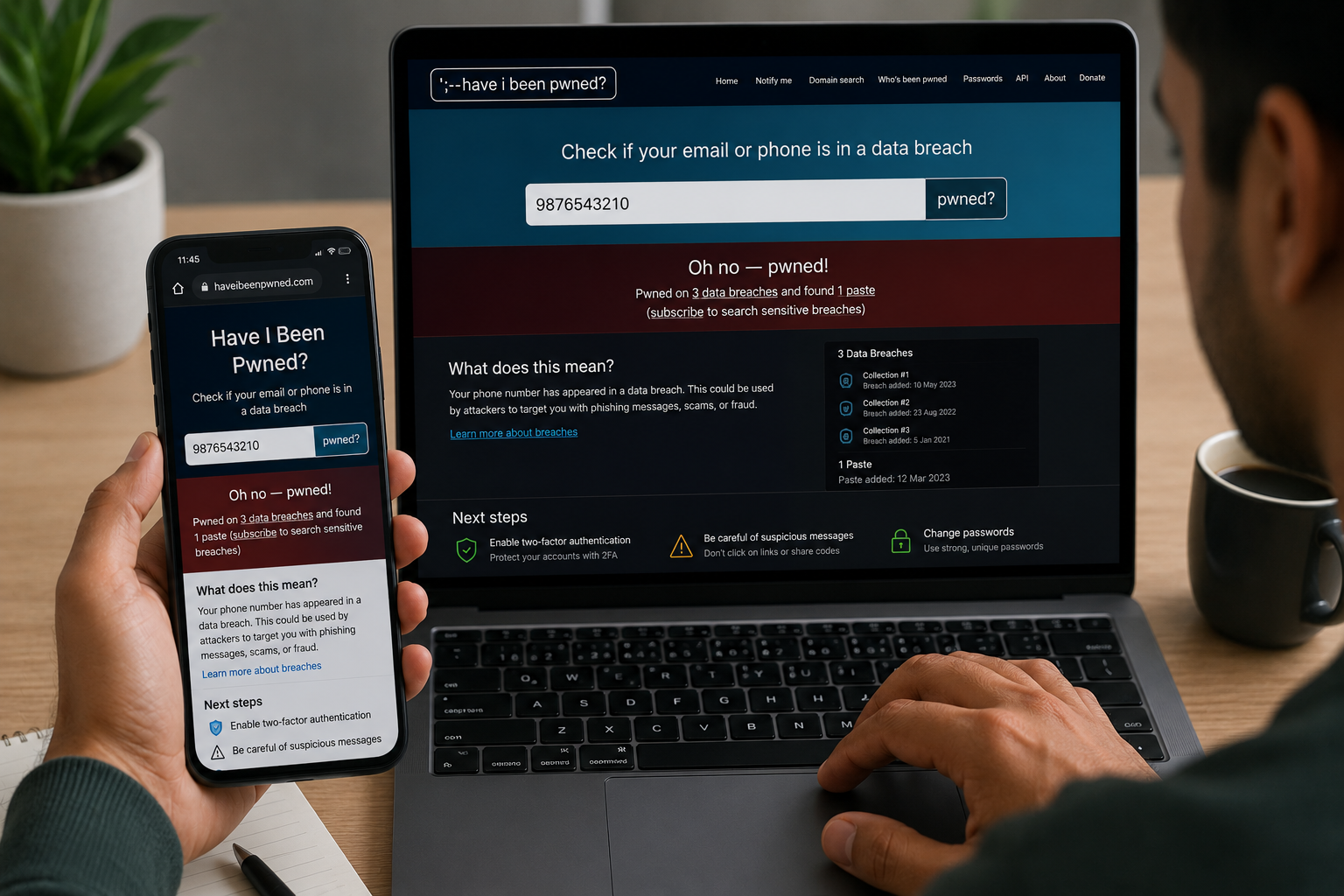
Several trusted security services notify users if their personal information appears in publicly known data breaches.
Enter your phone number only on reputable breach-checking services that clearly explain how they handle your data.
2. Review Your Google Account Security
Open your Google Account Security settings and review:
- Recent security alerts
- Unknown devices
- Login activity
- Recovery information
Unexpected activity may indicate that personal information linked to your phone number has been exposed.
3. Monitor Your Mobile Carrier Account
Log in to your telecom provider’s official website or app.
Check for:
- Unknown SIM replacements
- Unauthorized account changes
- Additional services you didn’t request
Report anything suspicious immediately.
4. Search Your Phone Number Carefully
Search your phone number in a search engine using quotation marks.
For example:
“9876543210”
If your number appears on public websites where you didn’t expect it, contact the website owner and request its removal where appropriate.
5. Check Privacy Settings on Social Media
Review privacy settings on:
- Telegram
Make sure your phone number isn’t visible publicly unless you intentionally want it to be.
6. Watch for Security Alerts
Many online services send notifications when:
- Someone attempts to log in.
- Your password changes.
- Your recovery phone number is modified.
- A new device signs in.
Never ignore these alerts.
7. Monitor Financial Accounts
If your phone number is linked to banking or UPI services:
- Review recent transactions.
- Check for unauthorized payments.
- Enable transaction alerts.
- Report suspicious activity to your bank immediately.
What to Do If Your Phone Number Is Leaked
If you believe your number has been exposed:
Change Important Passwords
Update passwords for:
- Email accounts
- Banking apps
- Social media
- Payment services
Enable Two-Factor Authentication (2FA)
Protect your accounts with an additional layer of security wherever available.
Be Careful with OTPs
Never share:
- OTPs
- PINs
- CVV numbers
- Passwords
Legitimate organizations generally won’t ask for these over a phone call or message.
Block Spam Numbers
Use your phone’s built-in spam protection features to block unwanted callers.
Report Fraud Attempts
If someone attempts to scam you using your leaked phone number:
- Report the incident to your telecom provider.
- Inform your bank if financial information is involved.
- File a complaint through the appropriate cybercrime reporting channels if necessary.
Tips to Protect Your Phone Number
Follow these best practices:
- Share your phone number only with trusted organizations.
- Avoid posting your number publicly on social media.
- Review app permissions regularly.
- Use different contact methods when appropriate.
- Enable spam protection features.
- Keep your phone updated.
- Stay alert for phishing calls and messages.
- Review privacy settings every few months.
Common Mistakes to Avoid
Avoid these common errors:
- Sharing OTPs with anyone.
- Clicking suspicious SMS links.
- Publishing your phone number publicly.
- Ignoring repeated spam calls.
- Using unofficial websites to check data breaches.
Read More :
- How to Remove Devices from Google Account: 7 Easy Steps
- How to Recover Instagram Without Email or Phone Number: 2026 Guide
- Spam Calls Band Kaise Kare
- Mobile Hang Ho Jaye To Kya Kare
Frequently Asked Questions
Can someone hack my phone using only my phone number?
A phone number alone is generally not enough to hack your device. However, scammers may use it in phishing attempts, SIM swap fraud, or social engineering attacks.
How do I know if my number appeared in a data breach?
Trusted breach notification services and security alerts can help identify whether your number was included in known public data breaches.
Should I change my phone number?
Changing your number is usually unnecessary unless you’re experiencing persistent harassment, fraud, or repeated security issues that cannot be resolved through other measures.
Can I stop spam calls completely?
No method guarantees the complete elimination of spam calls, but enabling spam filters, blocking unwanted numbers, and limiting where you share your phone number can significantly reduce them.
Final Thoughts
Learning How to Check If Your Phone Number Is Leaked Online is an important step toward protecting your digital identity. By monitoring your accounts, reviewing privacy settings, using trusted security tools, and responding quickly to suspicious activity, you can reduce the risk of scams and identity theft.
Stay cautious, never share sensitive verification codes, and regularly review the security of the accounts linked to your phone number.