Your Aadhaar card is one of the most important identity documents in India. It is linked to bank accounts, mobile numbers, PAN cards, government schemes, and many online services. If someone gains unauthorized access to your Aadhaar details, it could potentially be used for fraudulent activities. That’s why it’s important to know How to Check If Your Aadhaar Has Been Misused and take action if you notice anything suspicious.
In this guide, you’ll learn how to check if your Aadhaar has been misused, the warning signs of Aadhaar fraud, and the official methods to secure your identity.
Important: Never share your Aadhaar number, OTP, or biometric information with unknown people or unofficial websites.
Table of Contents
- What Is Aadhaar Misuse?
- Signs Your Aadhaar May Have Been Misused
- How to Check If Your Aadhaar Has Been Misused
- What to Do If Your Aadhaar Has Been Misused
- Tips to Protect Your Aadhaar
- Frequently Asked Questions
- Final Thoughts
What Is Aadhaar Misuse?
Aadhaar misuse occurs when someone uses your Aadhaar details without your permission for identity verification, financial services, SIM card registration, or other activities.
Possible misuse includes:
- Unauthorized eKYC verification
- Fake SIM card activation
- Fraudulent bank account opening
- Loan applications
- Government benefit fraud
- Identity theft
Monitoring your Aadhaar activity regularly can help detect suspicious usage early.
Signs Your Aadhaar May Have Been Misused
Watch for these warning signs:
- You receive OTPs you didn’t request.
- Unknown bank accounts appear linked to your Aadhaar.
- You receive messages about unfamiliar eKYC verification.
- Someone has activated a SIM card in your name.
- You notice suspicious financial transactions.
- You receive loan-related messages for applications you didn’t make.
If you notice any of these signs, investigate immediately.
How to Check If Your Aadhaar Has Been Misused
1. Check Aadhaar Authentication History
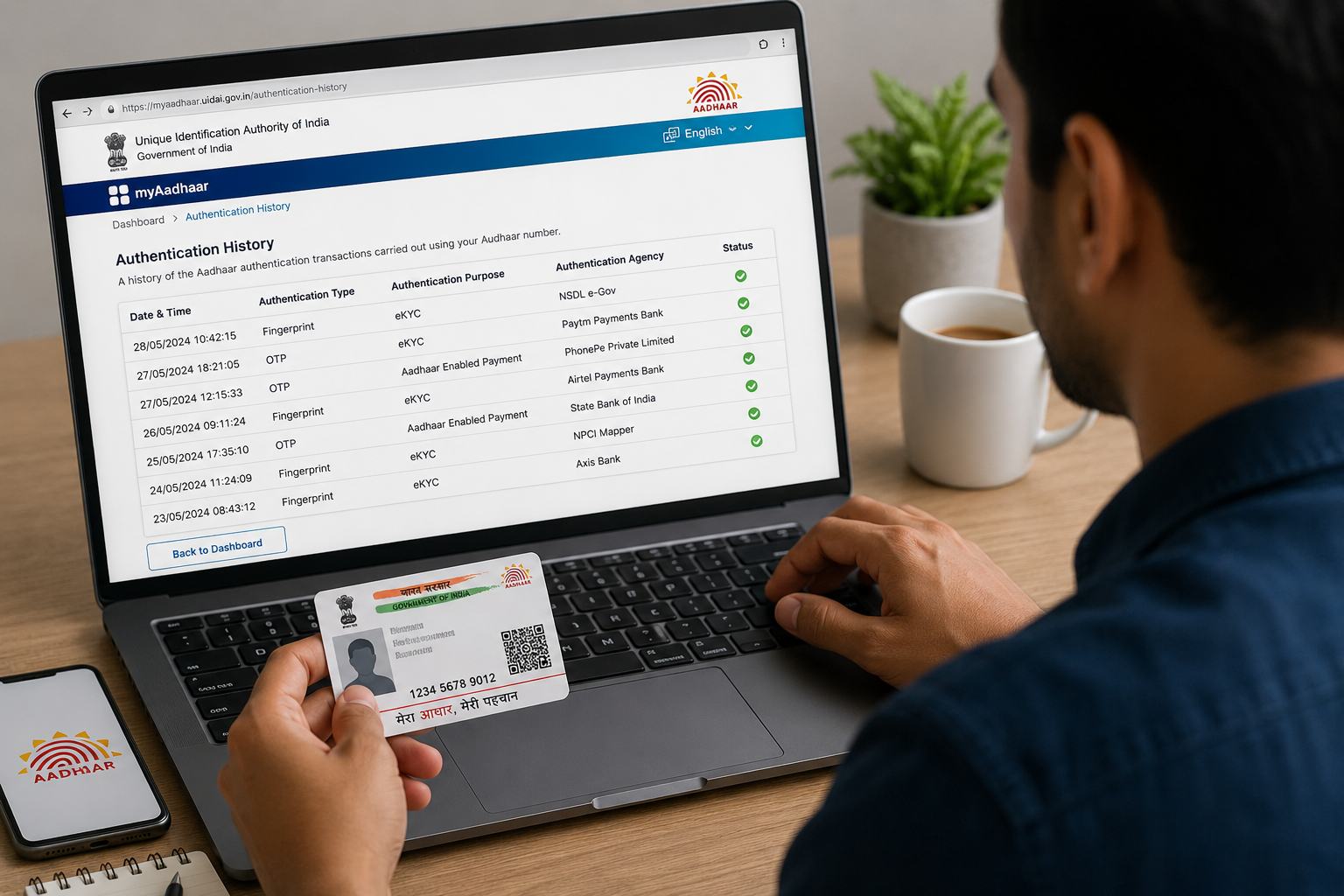
The easiest way to monitor Aadhaar usage is through the Authentication History service.
This allows you to see when your Aadhaar was used for authentication.
Review the records carefully for any transactions you don’t recognize.
2. Verify Aadhaar Authentication Requests
Review recent authentication details such as:
- Date
- Time
- Authentication type
- Agency requesting verification
If you don’t recognize an entry, investigate further.
3. Check Linked Mobile Numbers
Ensure only your own mobile number is linked to your Aadhaar.
If you suspect unauthorized mobile numbers, contact your telecom provider and update your Aadhaar records if necessary.
4. Verify Linked Bank Accounts
Check which bank accounts are linked to your Aadhaar.
If you notice an unfamiliar account, contact the bank immediately.
5. Lock Your Aadhaar Biometric Information
If you rarely use biometric authentication, consider locking your biometrics.
This helps prevent unauthorized fingerprint or iris authentication until you unlock them.
6. Monitor SMS and Email Alerts
Pay attention to notifications related to:
- Aadhaar authentication
- eKYC requests
- Banking updates
- SIM verification
Unexpected alerts may indicate suspicious activity.
7. Check for Unauthorized SIM Cards
If you receive calls or messages about unknown mobile connections, verify whether any SIM cards have been issued using your identity.
Contact your telecom provider if you suspect fraud.
8. Report Suspicious Activity Immediately
If you believe your Aadhaar has been misused:
- Contact the relevant service provider.
- Report the issue through official government channels.
- Inform your bank if financial services are involved.
- File a cybercrime complaint if identity theft is suspected.
Quick action can help limit potential damage.
What to Do If Your Aadhaar Has Been Misused
Follow these steps immediately:
Lock Your Aadhaar Biometrics
Prevent unauthorized biometric authentication until the issue is resolved.
Contact Your Bank
If banking fraud is suspected:
- Report suspicious transactions.
- Freeze affected accounts if necessary.
- Request additional security measures.
Update Your Mobile Number
Ensure your Aadhaar is linked to your current mobile number so you continue receiving important security notifications.
Monitor Your Credit and Financial Accounts
Review:
- Bank statements
- Loan records
- Credit reports
Look for unauthorized activity.
Report Cyber Fraud
If identity theft or financial fraud has occurred, report it to the appropriate cybercrime authorities as soon as possible.
Tips to Protect Your Aadhaar
Follow these best practices:
- Never share Aadhaar OTPs.
- Use only official government websites.
- Lock biometrics when not needed.
- Regularly check authentication history.
- Keep your mobile number updated.
- Avoid sharing photocopies unnecessarily.
- Mask your Aadhaar number whenever possible for services that don’t require the full number.
- Stay alert for phishing calls and emails.
Read More :
- Step by Step Guide How to Change Photo in Aadhar Card Online/ Offline
- Step by Steps Procedure to Link Pan Card with Aadhaar Card
- Apne Aadhar Number Ko EPF Account Se Kaise Link Kare | Sahitarika
- Aadhar Se Mobile And Bank Account Link Karne Ki Antim Date Janiye
Frequently Asked Questions
Can someone misuse my Aadhaar number alone?
Aadhaar misuse often requires additional information or authentication. However, you should still protect your Aadhaar number and avoid sharing it unnecessarily.
How often should I check my Aadhaar authentication history?
It’s a good idea to review your authentication history periodically or whenever you receive unexpected OTPs or security notifications.
Can I lock my Aadhaar biometrics?
Yes. The official Aadhaar services allow eligible users to lock and unlock biometric authentication as needed.
What should I do if I find suspicious Aadhaar activity?
Immediately contact the relevant service provider, inform your bank if financial services are affected, and report identity theft through official government or cybercrime channels.
Final Thoughts
Knowing How to Check If Your Aadhaar Has Been Misused is an essential part of protecting your digital identity. By regularly reviewing your Aadhaar authentication history, monitoring linked services, securing your biometrics, and responding quickly to suspicious activity, you can significantly reduce the risk of identity theft and fraud.
Stay vigilant, use only official Aadhaar services, and never share sensitive information such as OTPs or biometric data with untrusted sources.