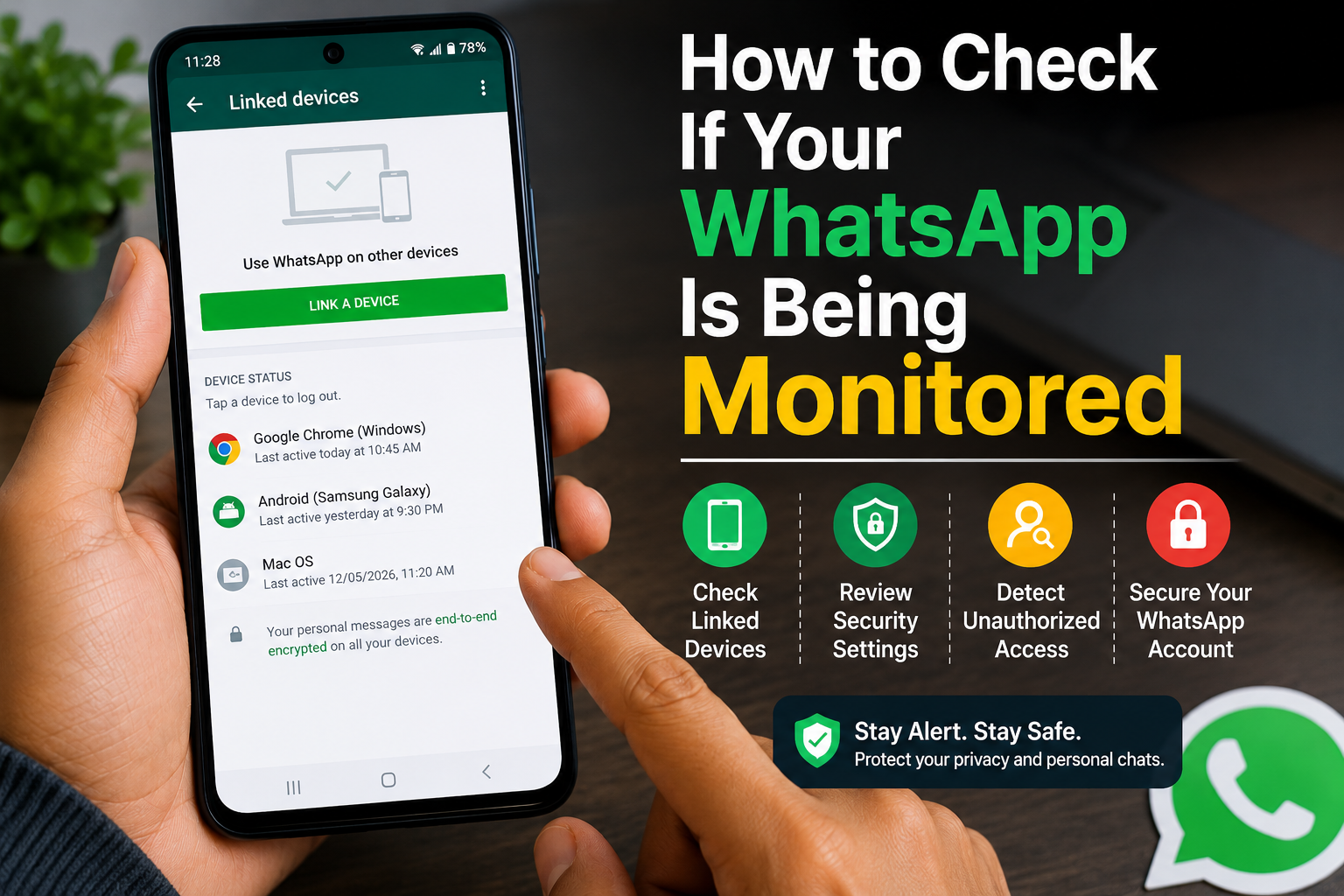
How to Check If Your WhatsApp Is Being Monitored is one of the most searched WhatsApp security questions in 2026. If you notice unusual activity, such as unknown messages being read, unexpected logouts, or unfamiliar linked devices, you may wonder whether someone else has access to your account.
In this guide, you’ll learn how to check if your WhatsApp is being monitored, identify common warning signs, and secure your account using WhatsApp’s built-in privacy features.
Important: Most unusual WhatsApp behavior is caused by device issues, accidental linked devices, or software bugs—not necessarily by someone spying on your account. Always verify before assuming your account has been compromised.
Table of Contents
- Can Someone Monitor Your WhatsApp?
- Signs Your WhatsApp May Be Monitored
- How to Check If Your WhatsApp Is Being Monitored
- How to Secure Your WhatsApp Account
- Tips to Protect Your Privacy
- Frequently Asked Questions
- Final Thoughts
Can Someone Monitor Your WhatsApp?
WhatsApp uses end-to-end encryption, meaning only you and the person you’re communicating with can read your messages. However, someone may gain access to your chats if:
- Your phone is unlocked.
- Your WhatsApp account is linked to another device without your knowledge.
- Someone has physical access to your phone.
- You fall for a phishing scam.
- Your verification code (OTP) is shared with someone else.
Fortunately, WhatsApp provides tools to detect and remove unauthorized access.
Signs Your WhatsApp May Be Monitored
Look for these warning signs:
- Messages appear as read even though you haven’t opened them.
- Unknown devices are linked to your WhatsApp account.
- You receive an OTP without requesting it.
- Your account logs out unexpectedly.
- Contacts receive messages you didn’t send.
- Your profile picture or status changes without your permission.
- Battery drains unusually fast due to background activity.
- You notice unfamiliar security notifications.
One sign alone doesn’t confirm monitoring, but multiple signs should prompt you to review your account.
How to Check If Your WhatsApp Is Being Monitored
Step 1: Check Linked Devices
Open WhatsApp.
Go to:
Menu (⋮) → Linked Devices
(or Settings → Linked Devices on iPhone).
Review all linked devices.
If you see a device you don’t recognize:
- Tap the device.
- Select Log Out immediately.
Step 2: Review Recent Security Notifications
Check whether you’ve received:
- Login alerts.
- Verification code requests.
- Security notifications.
- Device linking confirmations.
If you didn’t perform these actions, secure your account immediately.
Step 3: Check Login Activity
Review the Linked Devices section for:
- Device type
- Last active time
- Browser or operating system
Unknown activity could indicate unauthorized access.
Step 4: Watch for Unexpected OTP Messages
If you receive WhatsApp verification codes without requesting them:
- Do not share the code.
- Ignore suspicious calls asking for the OTP.
- Enable additional security features.
Step 5: Enable Two-Step Verification
Go to:
Settings → Account → Two-step Verification
Create a secure PIN.
This adds another layer of protection if someone tries to register your phone number.
Step 6: Check Privacy Settings
Open:
Settings → Privacy
Review:
- Last Seen
- Online Status
- Profile Photo
- About
- Status
- Calls
Ensure your settings haven’t changed unexpectedly.
Step 7: Update WhatsApp
Install the latest version of WhatsApp.
Security updates help fix vulnerabilities and improve account protection.
Step 8: Scan Your Phone for Malware
Although uncommon, malicious apps can compromise device security.
- Remove unknown apps.
- Update Google Play Protect.
- Install apps only from trusted sources.
Step 9: Review Your Google or Apple Account
Since your WhatsApp backups may be linked to Google Drive or iCloud, ensure those accounts are secure.
Check:
- Connected devices.
- Recent login activity.
- Recovery information.
Step 10: Log Out from All Linked Devices
If you’re unsure whether your account has been accessed:
- Remove every linked device.
- Sign in again only on your own devices.
- Enable Two-Step Verification afterward.
How to Secure Your WhatsApp Account
Follow these steps:
Enable Two-Step Verification
Always keep it enabled.
Never Share OTPs
WhatsApp will never ask you to share your verification code through calls or messages.
Lock WhatsApp
Enable:
- Fingerprint lock
- Face Unlock
- Device PIN
Keep Your Phone Updated
Install Android or iPhone security updates regularly.
Review Linked Devices Monthly
Make it a habit to check for unknown devices.
Tips to Protect Your Privacy
- Use a strong screen lock.
- Never leave your phone unlocked.
- Don’t install unofficial WhatsApp versions.
- Avoid suspicious links.
- Enable Google Play Protect.
- Keep backups secure.
- Review app permissions regularly.
- Check linked devices every month.
Common Mistakes to Avoid
Avoid these mistakes:
- Sharing your OTP with anyone.
- Ignoring security notifications.
- Leaving unknown linked devices connected.
- Installing WhatsApp mods.
- Clicking phishing links.
Read More:
- WhatsApp Chat Lock Kaise Kare
- WhatsApp Par Block Hone Ka Pata Kaise Kare
- WhatsApp Backup Not Working? Fix It Fast
- How to Recover Deleted WhatsApp Chats: 8 Proven Methods
Frequently Asked Questions
Can someone monitor my WhatsApp without touching my phone?
In most cases, someone would need access to your verification code, a linked device, or your unlocked phone. End-to-end encryption helps protect your messages.
How do I know if someone linked my WhatsApp?
Open Linked Devices and review every connected device. Remove any device you don’t recognize.
Does WhatsApp notify me when a new device is linked?
Yes. WhatsApp generally sends a notification when a new device is successfully linked to your account.
Can I remove someone from my WhatsApp account?
Yes. Open Linked Devices, select the unfamiliar device, and tap Log Out.
Final Thoughts
Knowing How to Check If Your WhatsApp Is Being Monitored can help you protect your conversations and personal information. By reviewing linked devices, enabling Two-Step Verification, checking security notifications, and keeping your phone updated, you can significantly improve your account security.
Regularly checking your WhatsApp security settings is a simple habit that can help keep your account safe.