Spam calls have become a daily problem for millions of Android users. From telemarketing and robocalls to fake bank representatives and scam callers, unwanted calls can waste your time and even put your personal information at risk. If you’re searching for How to Remove Spam Calls Automatically on Android, this guide will show you the safest and most effective methods.
In this article, you’ll learn how to remove spam calls automatically on Android, block unknown callers, enable built-in spam protection, and reduce scam calls without installing risky apps.
Important: No solution can block every spam call. However, combining Android’s built-in features with trusted caller ID services can significantly reduce unwanted calls.
Table of Contents
- What Are Spam Calls?
- Why Am I Receiving So Many Spam Calls?
- How to Remove Spam Calls Automatically on Android
- How to Block Unknown Numbers
- Tips to Reduce Spam Calls
- Frequently Asked Questions
- Final Thoughts
What Are Spam Calls?
Spam calls are unwanted phone calls made for advertising, scams, robocalls, or fraudulent purposes.
Common types include:
- Fake bank calls
- Insurance promotions
- Loan offers
- Credit card sales
- Lottery scams
- UPI fraud calls
- Fake customer support
- Investment scams
- Automated robocalls
Some spam calls are merely annoying, while others are designed to steal money or personal information.
Why Am I Receiving So Many Spam Calls?
You may receive spam calls because:
- Your phone number appeared in a data breach.
- You entered your number on public websites.
- You accepted unnecessary marketing permissions.
- Apps shared your data with advertisers.
- Your number was randomly generated by telemarketing systems.
- Scammers obtained your number from leaked databases.
How to Remove Spam Calls Automatically on Android
Method 1: Enable Android Spam Protection
Most modern Android phones include built-in spam detection.
Steps:
- Open the Phone app.
- Tap the three-dot menu.
- Open Settings.
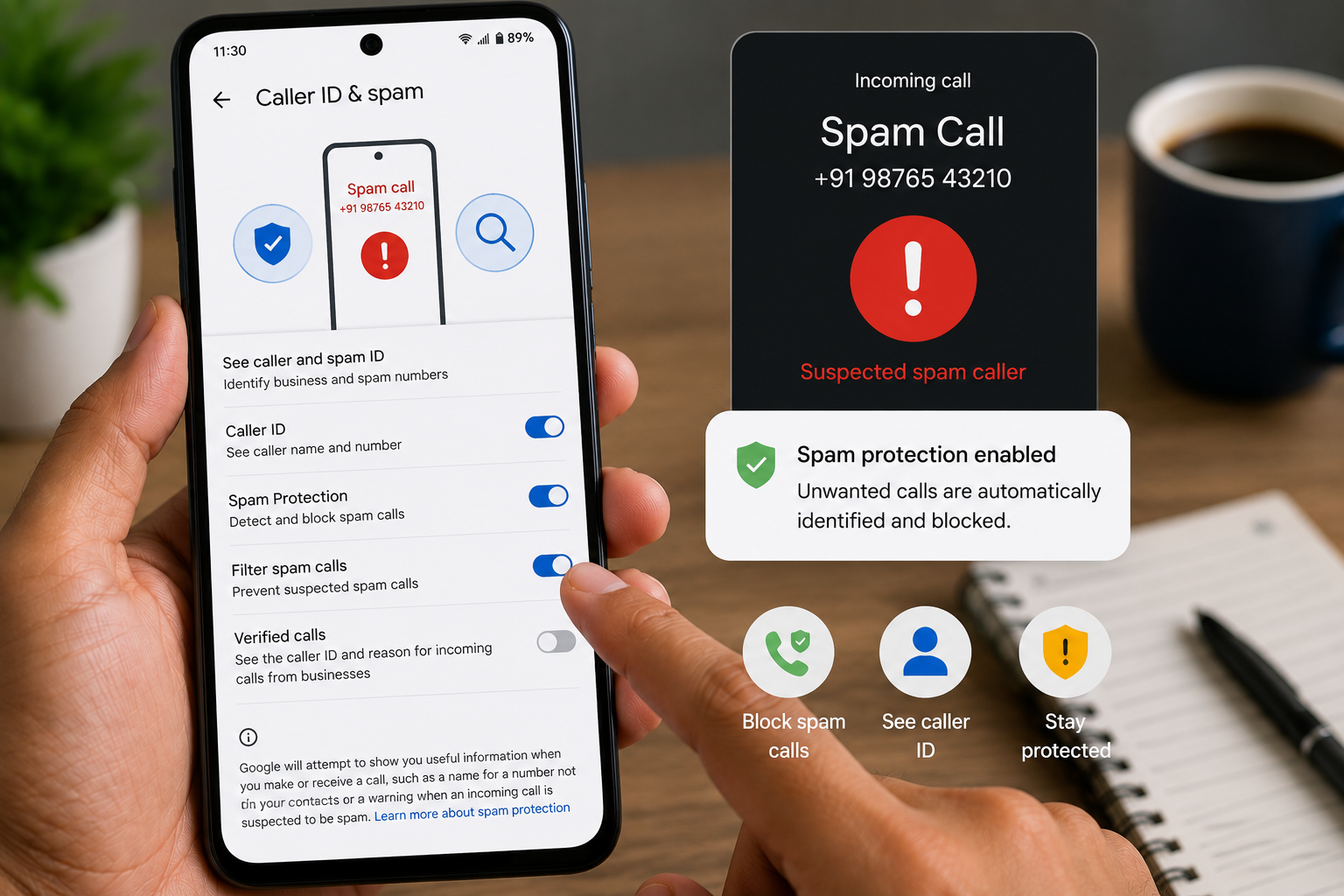
- Select Caller ID & Spam.
- Turn on:
- Caller ID
- Spam Protection
- Filter Spam Calls (if available)
This helps identify and automatically filter many suspected spam calls.
Method 2: Block Unknown Numbers
Many Android phones allow you to block unknown callers.
Go to:
Phone Settings → Block Numbers
Enable:
- Block Unknown Numbers
- Block Hidden Numbers
Menu names may vary by manufacturer.
Method 3: Use Google Phone App
The official Google Phone app includes advanced spam protection features on supported devices.
Benefits include:
- Spam detection
- Caller ID
- Fraud warnings
- Business caller information
Keep the app updated for the latest protection.
Method 4: Enable Your Telecom Provider’s Spam Filter
Some mobile carriers provide spam detection and caller filtering services.
Check your telecom provider’s official app or website to see whether spam protection is available.
Method 5: Block Individual Spam Numbers
If the same number repeatedly calls:
- Open the Phone app.
- Tap Recent Calls.
- Select the number.
- Tap Block or Report Spam.
This prevents future calls from that specific number.
Method 6: Don’t Answer Unknown Calls
If you don’t recognize a number:
- Let it ring.
- If it’s important, the caller will usually leave a voicemail or contact you another way.
Avoid interacting with suspicious callers.
Method 7: Report Spam Calls
Reporting spam helps improve caller identification systems.
Many phone apps allow you to:
- Report spam
- Report fraud
- Report scam callers
Your report may help protect other users.
Method 8: Review App Permissions
Some apps collect your phone number for marketing purposes.
Go to:
Settings → Privacy → Permission Manager
Review:
- Contacts
- Phone
- SMS
Remove permissions from apps that don’t need them.
Method 9: Register for Do Not Disturb (DND)
If available in your region, register your mobile number with your telecom provider’s Do Not Disturb (DND) service to reduce promotional calls and SMS messages.
Keep in mind that DND may not stop fraudulent or illegal scam calls.
How to Block Unknown Numbers
Most Android phones provide built-in blocking options.
Open:
Phone → Settings → Block Numbers
Enable:
- Block Unknown Callers
- Block Hidden Numbers
- Spam Filtering
These settings vary depending on your phone manufacturer.
Tips to Reduce Spam Calls
Protect yourself by following these tips:
- Never share OTPs.
- Don’t answer suspicious international calls.
- Avoid clicking links sent through SMS.
- Don’t provide banking information over the phone.
- Register for DND services if available.
- Keep Android updated.
- Review privacy settings regularly.
- Avoid posting your phone number publicly.
Common Mistakes to Avoid
Avoid these common mistakes:
- Calling unknown spam numbers back.
- Sharing personal information.
- Trusting caller ID alone.
- Installing unknown caller ID apps.
- Ignoring fraud warnings.
Read More:
- How to Recover Permanently Deleted Photos on Android
- Android Phone Hanging Frequently? 15 Fixes That Actually Work
- Android Phone Slow Ho Gaya Hai To Kya Kare? 10 Best Tarike
- नंबर सेव किए बिना WhatsApp मैसेज भेजें iPhone और Android के लिए आसान गाइड
Frequently Asked Questions
Can Android automatically block spam calls?
Many Android devices include built-in spam detection and blocking features, but effectiveness depends on your device, software version, and region.
Will DND stop all spam calls?
No. DND services typically reduce promotional calls but may not stop scammers or fraudulent callers.
Are spam blocker apps safe?
Some well-known apps are reputable, but you should install apps only from trusted developers and review the permissions they request.
Why do spam callers keep changing numbers?
Scammers often rotate or spoof phone numbers to avoid being blocked and to increase the chances that someone answers.
Final Thoughts
Knowing How to Remove Spam Calls Automatically on Android can help you reduce unwanted interruptions and improve your phone’s security. By enabling Android’s built-in spam protection, blocking unknown callers, reviewing app permissions, and staying alert to scam tactics, you can greatly reduce the number of unwanted calls you receive.
Remember, never share sensitive information such as OTPs, banking PINs, or passwords during unsolicited phone calls, even if the caller claims to represent a trusted organization.