How to Identify Fake QR Codes Before Scanning is an essential cybersecurity skill in 2026. QR codes are everywhere—restaurants, parking meters, payment systems, advertisements, and public places. While they’re convenient, scammers are increasingly using fake QR codes to steal personal information, banking details, and login credentials.
In this guide, you’ll learn how to identify fake QR codes before scanning, recognize common warning signs, and protect yourself from QR code scams.
Important: A QR code itself isn’t dangerous, but the website or action it directs you to can be. Always verify before scanning.
Table of Contents
- What Is a Fake QR Code?
- How QR Code Scams Work
- How to Identify Fake QR Codes Before Scanning
- What to Do If You Scan a Fake QR Code
- Tips to Stay Safe from QR Code Scams
- Frequently Asked Questions
- Final Thoughts
What Is a Fake QR Code?
A fake QR code is a malicious QR code created or placed by scammers to redirect users to fraudulent websites or trigger unwanted actions.
These scams may attempt to:
- Steal login credentials
- Collect banking information
- Install malware
- Redirect to fake payment pages
- Trick users into downloading harmful apps
Knowing how to identify fake QR codes before scanning can help protect your personal and financial information.
How QR Code Scams Work
Scammers often place fake QR code stickers over legitimate ones.
Common targets include:
- Restaurant menus
- Parking payment machines
- Public charging stations
- Event posters
- ATMs
- Shopping malls
- Public advertisements
When scanned, the fake code redirects users to a phishing website instead of the legitimate destination.
How to Identify Fake QR Codes Before Scanning
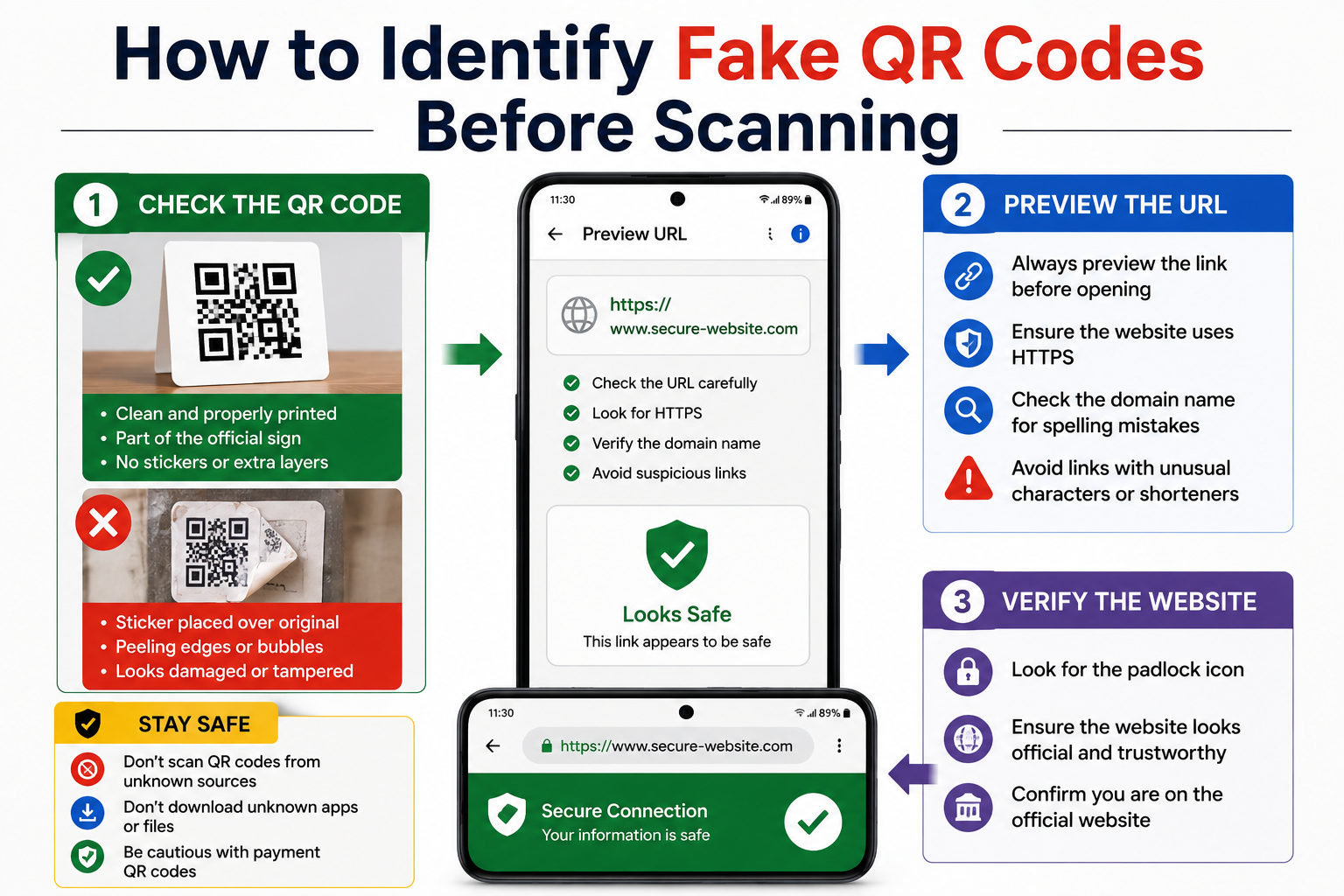
Step 1: Check for Stickers Placed Over Original QR Codes
Look closely at the QR code.
Warning signs include:
- Uneven stickers
- Peeling edges
- Multiple layers
- Poor print quality
- Misaligned labels
A sticker covering another QR code is a major warning sign.
Step 2: Preview the Website Before Opening
Most Android phones display the website address before opening it.
Carefully review the URL.
Look for:
- Correct domain name
- HTTPS security
- No unusual characters
- No random numbers or symbols
If the web address looks suspicious, don’t open it.
Step 3: Watch for Misspelled Website Names
Scammers often create fake websites with similar names.
Examples:
- g00gle.com
- paytm-secure.xyz
- amaz0n-login.net
Always verify the official domain before entering any information.
Step 4: Avoid QR Codes in Suspicious Locations
Be cautious with QR codes found on:
- Lamp posts
- Random flyers
- Unverified advertisements
- Unknown emails
- Social media comments
Only scan QR codes from trusted sources.
Step 5: Be Careful with Payment QR Codes
Before making a payment:
- Verify the merchant’s name.
- Confirm the payment amount.
- Double-check the recipient information.
- Cancel the transaction if anything looks unusual.
Step 6: Don’t Download Unknown Apps
If a QR code immediately asks you to download an APK or install an unfamiliar app, avoid it.
Install apps only from the Google Play Store or other trusted sources.
Step 7: Use Google Safe Browsing
If a scanned QR code opens a website that triggers browser security warnings, leave the page immediately.
Google Safe Browsing helps detect many malicious websites.
What to Do If You Scan a Fake QR Code
If you accidentally scan a suspicious QR code:
Close the Website Immediately
Don’t continue browsing.
Don’t Enter Personal Information
Avoid entering:
- Passwords
- OTPs
- Banking details
- Credit card information
Delete Downloaded Files
If anything was downloaded automatically, remove it unless you’re certain it’s safe.
Scan Your Device
Use Google Play Protect or a trusted security app to check for harmful software.
Change Your Passwords
If you entered your login credentials on a suspicious website, change your password immediately and enable two-factor authentication where available.
Tips to Stay Safe from QR Code Scams
Follow these security tips:
- Preview links before opening them.
- Scan QR codes only from trusted businesses.
- Verify payment details before confirming transactions.
- Keep Android updated.
- Enable Google Play Protect.
- Never install APK files from unknown websites.
- Avoid scanning damaged or altered QR codes.
- Use secure internet connections when making payments.
Common Mistakes to Avoid
Avoid these common mistakes:
- Scanning every QR code you see.
- Ignoring website previews.
- Entering passwords without checking the URL.
- Downloading apps from unknown sources.
- Rushing through digital payments.
Read More:
Frequently Asked Questions
Can QR codes contain viruses?
A QR code itself cannot contain a virus. However, it can direct you to malicious websites or downloads that may compromise your device.
How do I know if a QR code is safe?
Check for tampering, preview the destination URL, and scan QR codes only from trusted sources.
Should I trust QR codes on public posters?
Only if they appear genuine and the destination website matches the organization that posted them.
What should I do if I entered my password on a fake QR code website?
Change your password immediately, enable two-factor authentication, and monitor your accounts for suspicious activity.
Final Thoughts
Knowing How to Identify Fake QR Codes Before Scanning can help protect you from phishing attacks, payment fraud, and identity theft. By checking for tampering, previewing website links, verifying payment details, and avoiding suspicious downloads, you can safely use QR codes without putting your personal information at risk.
A few seconds of verification before scanning can save you from serious security problems.