Skip to content
needtricks_logo

Need Tricks

Technology Tips and Tricks

  • Home
  • Internet
    • Ad Networks
      • Internet Browser
        • Firefox
        • Opera
        • Safari
      • Internet Explorer
    • Content
      • Chrome
    • Analytics
  • Computer
    • Desktop
    • Laptop
  • General
    • Household
  • Social Networks
    • Facebook
    • Google Plus
    • Twitter
    • Youtube
  • Operating System
    • Apple
    • Android
    • Windows
    • Bada
    • Blackberry
  • Technology
  • Home
  • General
  • How to get Godaddy hosting at $2.50/m

How to get Godaddy hosting at $2.50/m

How to get Godaddy hosting at $2.50/m

Godady is am american Internet domain registrar and web hosting company. Godady is the most popular domain selling site globably. Godady has more than 60 millions domains under management. You can buy a domain on Godady in order create a website. In this article we are going to tell you How to get Godaddy hosting at $2.50/m.

How to get Godaddy hosting at $2.50/m

You may also like : 16 Things You Dint Know About Technology


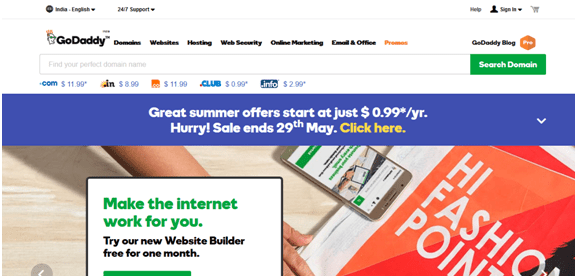
1. First visit Godaddy website. There you’ll see 4 types of plan. Those plans are Starter, Economy, Deluxe, Ultimate Plan.

b1 b2 b3 b4 b5

2. You can choose anyone but we suggest you to take starter plan and then upgrade to which plan you want to upgrade.

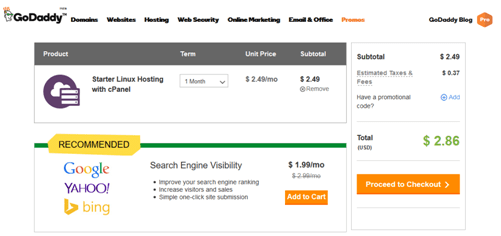
3.Then click “Add to Cart” Button.

b2

4.If you haven’t signed up just click on signup link and enter your details and done

b3

5. After this enter your Card / Net Banking Details and click on make payment button.

6.And you are done.

Now we have got Godady's hosting so now we will know about how to access the web hosting. So, let’s start

1.Open Godaddy and then click on “Sign In” button.  

b4

2.Now “Sign In” by filling your correct credentials.

b5

3.Now Click on “Web Hosting”.

4.Now click on “Manage”.

5.That’s it now you are in cPanel.


Starter Hosting Features:

  • 1 website
  • 30 GB Storage
  • Unmetered bandwidth
  • Site backup & restore (paid option)
  • Economy Hosting Features:

You may also like : How to Get Rid of Chrome Notifications

  • Free Domain per year
  • Unlimited Bandwidth
  • 100 GB Storage
  • 99.9% up-time guarantee
  • UpTo 50 FTP Accounts
  • 100 free email accounts
  • 200+ Free Application with 1 Click Install Option
  • 45 Days Money Back guarantee
  • 10 GB space for MySQL Databases
  • 200 MB MS-SQL Database
  • 24/7 security monitoring
  • 24/7 Customer Support
  • Malware scanning and DDoS protection.


Deluxe Plan:

  • Unlimited websites
  • Unmetered storage 
  • Unmetered bandwidth
  • Free Business Email – 1st year
  • Free domain* with annual plan
  • Site backup & restore (paid option)
  • Ultimate Plan:
  • Unlimited websites
  • Unmetered storage 
  • Unmetered bandwidth
  • Free Business Email – 1st year
  • Free domain* with annual plan
  • Site backup & restore (paid option)
  • 2X processing power & memory (Linux w/ cPanel only)
  • Premium DNS
  • 1-year SSL certificate†† to secure customer data and increase search rankings. (Restrictions Apply)

You may also like : 5 Interesting Google Tricks That You Must Know

In the above article we discussed How to get Godaddy hosting at $2.50/m. Hope you would like reading this article and it would be helpful. Please do like, comment and share.

Share this:

  • Email a link to a friend (Opens in new window) Email
  • Share on Facebook (Opens in new window) Facebook
  • Share on Tumblr (Opens in new window) Tumblr
  • Print (Opens in new window) Print
  • Share on LinkedIn (Opens in new window) LinkedIn
  • Share on Reddit (Opens in new window) Reddit
  • Share on X (Opens in new window) X
  • Share on WhatsApp (Opens in new window) WhatsApp
  • Share on Pinterest (Opens in new window) Pinterest

Like this:

Like Loading…

Related

GeneralWebsite
Tagged bigrock hosting, cheapest web hosting india, GoDaddy Hosting, godaddy hosting login, godaddy hosting plans yearly, GoDaddy Web Hosting Review, Host Your Website, how to host a website on godaddy, How to set up a domain and hosting with Godaddy, web hosting godaddy, web hosting india

Post navigation

⟵ How To Make Google Chrome Work Faster
How To Use Google Earth Pro For Free ⟶

Related Posts

How to Get Indian Visa

Advisory: e-Visa is an online application process for Indian Visa which no intermediary/ agents is required. We advised not to believe…

Share this:

  • Email a link to a friend (Opens in new window) Email
  • Share on Facebook (Opens in new window) Facebook
  • Share on Tumblr (Opens in new window) Tumblr
  • Print (Opens in new window) Print
  • Share on LinkedIn (Opens in new window) LinkedIn
  • Share on Reddit (Opens in new window) Reddit
  • Share on X (Opens in new window) X
  • Share on WhatsApp (Opens in new window) WhatsApp
  • Share on Pinterest (Opens in new window) Pinterest

Like this:

Like Loading…
5G
5G Magic – Tempting advantages but compromise with Nature

Magic of 5G – Tempting advantages but compromise with Nature It is no longer a hidden project that 5G has…

Share this:

  • Email a link to a friend (Opens in new window) Email
  • Share on Facebook (Opens in new window) Facebook
  • Share on Tumblr (Opens in new window) Tumblr
  • Print (Opens in new window) Print
  • Share on LinkedIn (Opens in new window) LinkedIn
  • Share on Reddit (Opens in new window) Reddit
  • Share on X (Opens in new window) X
  • Share on WhatsApp (Opens in new window) WhatsApp
  • Share on Pinterest (Opens in new window) Pinterest

Like this:

Like Loading…
backup whatsapp on android
How To Take A Backup In Whatsapp Using Android

If you want to take a backup in Whatsapp using Android, then it’s very easy task. Just follow these instructions.…

Share this:

  • Email a link to a friend (Opens in new window) Email
  • Share on Facebook (Opens in new window) Facebook
  • Share on Tumblr (Opens in new window) Tumblr
  • Print (Opens in new window) Print
  • Share on LinkedIn (Opens in new window) LinkedIn
  • Share on Reddit (Opens in new window) Reddit
  • Share on X (Opens in new window) X
  • Share on WhatsApp (Opens in new window) WhatsApp
  • Share on Pinterest (Opens in new window) Pinterest

Like this:

Like Loading…

Some Additional Links

  • Home
  • Editorial team information
  • Corrections Policy
  • Ethics Policy
  • Fact checking Policy
  • About us
  • Submit your trick
  • Contact us
  • Terms and Conditions
  • Visitor Post
  • Privacy Policy

Popular Posts

  • digital connection smartphones 53876 1070114
    Why Being Constantly Connected Doesn’t Always Make Life Easier
  • businessman working futuristic office 23 2151003754
    The Technology Predictions From 10 Years Ago That Never Happened
  • hands holding smartphone platform near train 23 2147953122
    Why Smartphone Cameras Keep Getting Better Without More Megapixels
  • programming home 118813 4357
    What Happens Behind the Scenes When You Type a Website Address?
  • customer experience creative collage 23 2149371200
    Why People Trust Online Reviews Even When They Know Some Are Fake
  • old laptop abandoned woods covered moss leaves 14117 1093959
    How Long Should a Laptop Last Before You Replace It?
  • top view crowd surrounding wifi signal icon symbol 841543 56446
    Why Public WiFi Can Be Risky (And What Most People Ignore)
  • business man holding digital chatbot artificial intelligence ai with hacking warning alert cyber 144352 864
    Can AI Be Wrong? Understanding the Limits of Artificial Intelligence
  • businessman raise your hand with icon loading display laptop 281691 3499
    Why Some Websites Load Instantly While Others Feel Slow
Follow Us
  • Facebook
  • Twitter
  • Instagram
  • YouTube
  • LinkedIn
  • Pinterest
  • Quora
Quick Links
  • Home
  • Editorial team information
  • Corrections Policy
  • Ethics Policy
  • Fact checking Policy
  • About us
  • Submit your trick
  • Contact us
  • Terms and Conditions
  • Visitor Post
  • Privacy Policy
Copyright © 2026 Need Tricks | Extensive News by Ascendoor | Powered by WordPress.

Loading Comments...

    %d